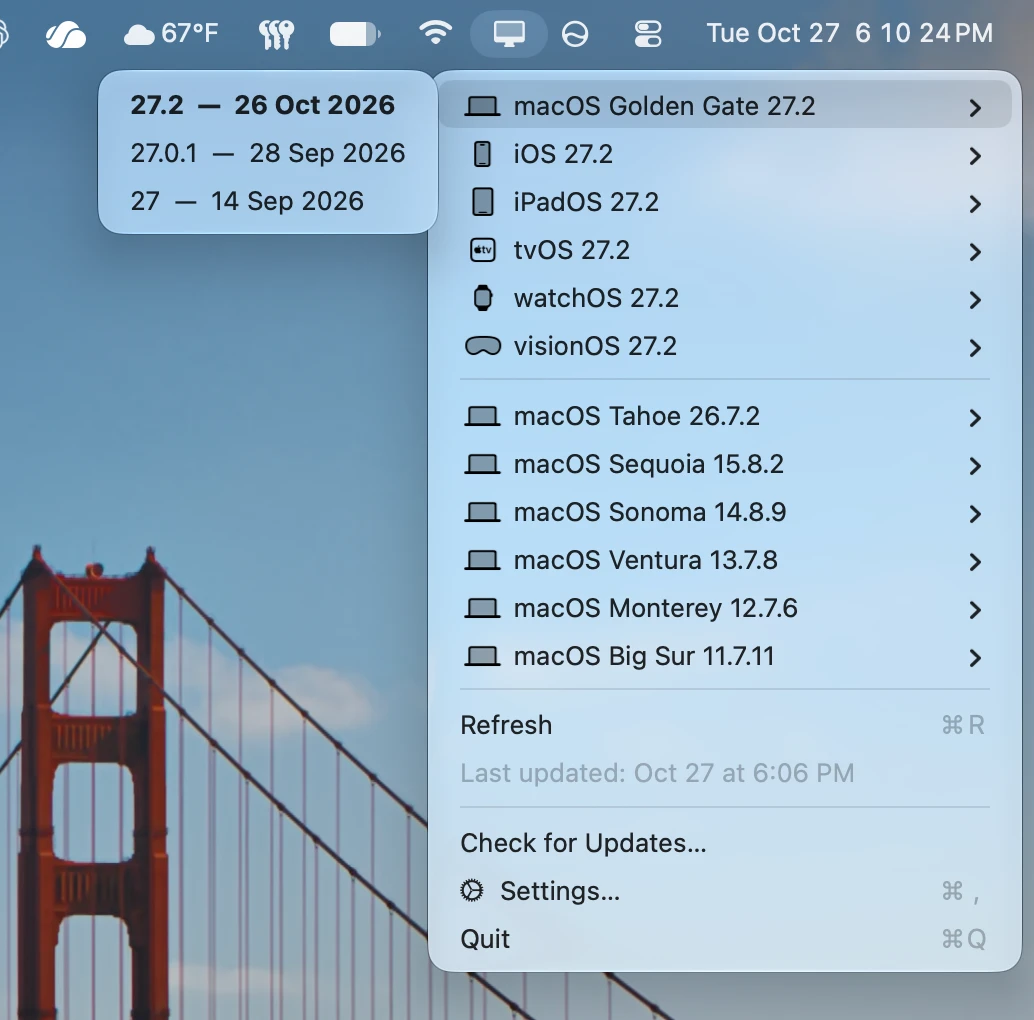
A Mac menu bar utility that shows the latest Apple operating system
releases at a glance. It reads Apple’s security releases page and
lists the newest version of each platform, so you don’t have to go
looking.
Lives in the menu bar only. No Dock icon and no main window.
Shows the latest release for each Apple operating system: macOS, iOS, iPadOS, tvOS, watchOS, and visionOS, each with its own glyph.
Puts the newest macOS at the top, followed by the other platforms, with older macOS versions grouped below a divider from newest to oldest.
Lists earlier releases in a submenu for each platform, with release dates, and the newest version highlighted.
Opens Apple’s support article for any release with a single click.
Keeps iOS and iPadOS separate, even when Apple lists them together.
Refreshes on your schedule. Choose on launch, every hour, every 6 hours, every day, or manually only in Settings.
Flags new releases. When a refresh finds a newer version, a small dot appears on the menu bar icon and next to each new release until you’ve opened it.
Sends one notification per batch of new releases instead of one for every platform. Notifications can be turned off in Settings.
Shows a subtle loading indicator in the menu bar while it fetches, and the time of the last successful update in the menu.
Keeps itself up to date with built-in app updates powered by Sparkle.